Gramps web report project
Enhanced Narrated Web Site
My extended workflow for the Gramps Narrated Web Site report, with additional relationship information, search functions and presentation changes.
Why this project exists
Gramps' Narrated Web Site report can generate a complete linked family website with people, families, events, places, media and sources. I find it useful when I want a clear overview of a family tree without having Gramps open.
A generated site can also be placed on a web server and shared with selected people. If living people are included, the site can contain personal information and should therefore be protected appropriately.
The standard report can be viewed directly from local files. My version adds search and processing features that require the generated site to be served through a web server, including a simple local Python server when testing it on a computer.

What this version adds
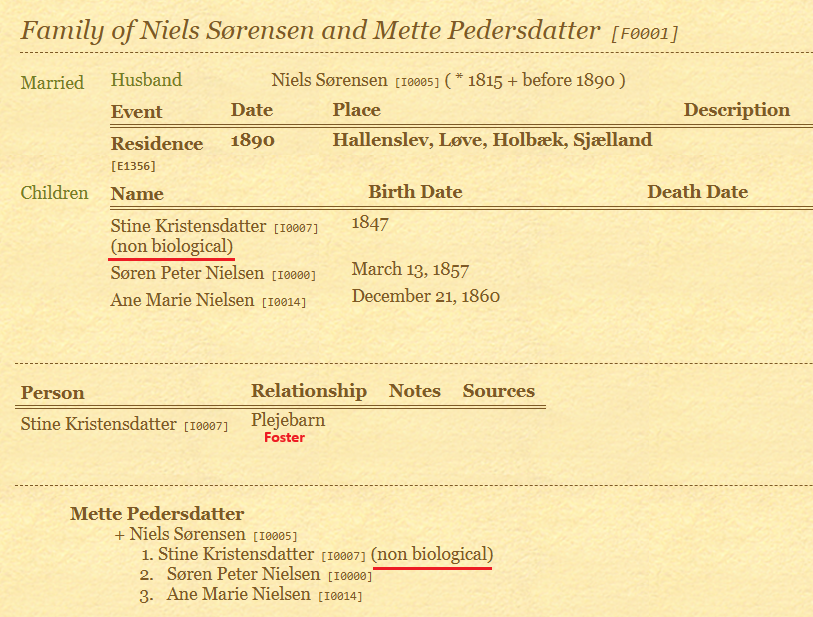
- Relationship path — biological people can show their relationship path back to the selected Home person.
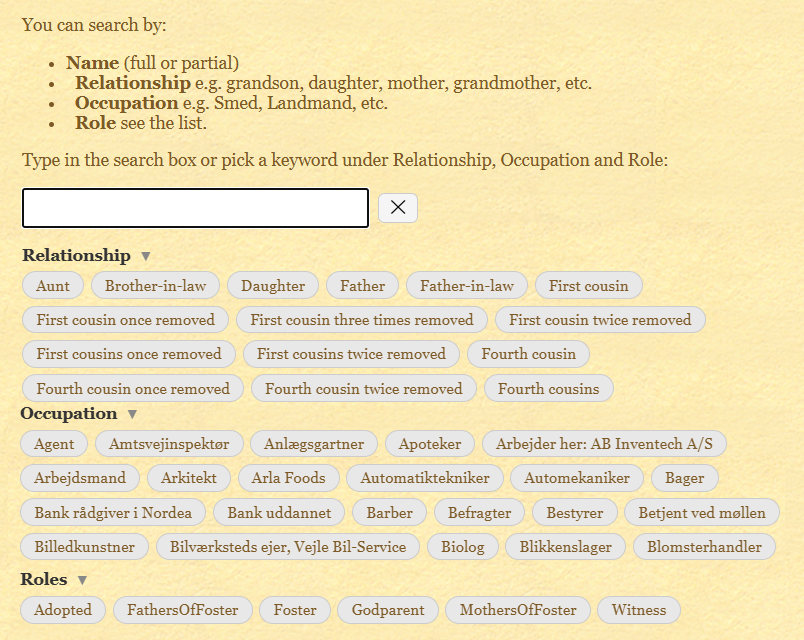
- Non-biological child marking — foster and other non-biological relationships are made visible in the generated family pages.
- Extended search — search by name, relationship, occupation or selected roles.
- Calendar surname adjustment — a wife's calendar surname follows her husband's surname, except after a later remarriage.
- Pedigree chart PDF — the ancestor chart includes a direct PDF download option.
- Menu changes — the generated site includes shortcuts that fit the way I use the report.
Search the generated family site
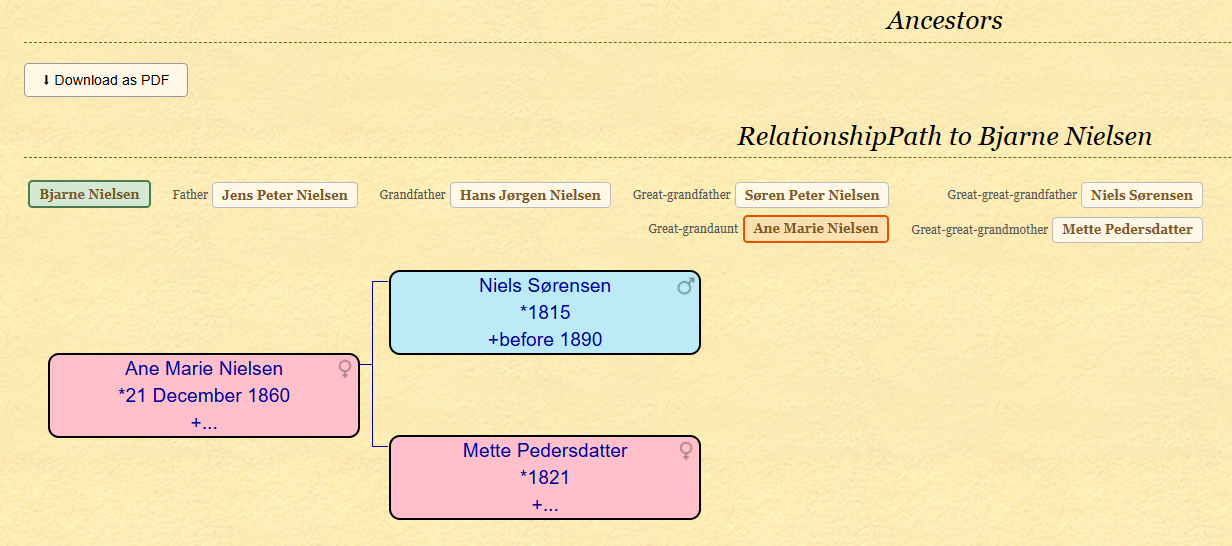
The added search page combines information produced by the Narrated Web Site with data prepared by the included Python scripts. You can search directly by a person's name or use relationship, occupation and role terms.
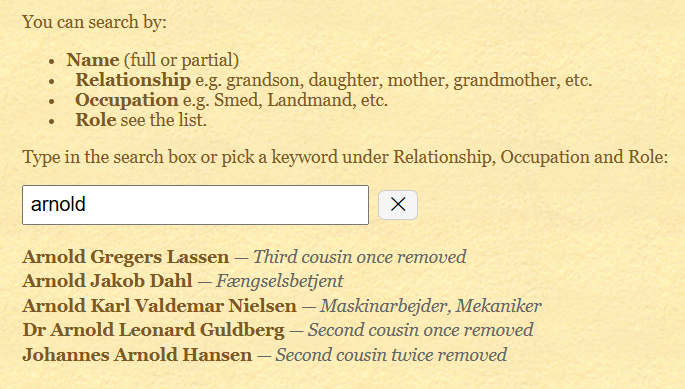
Relationship searches can be used for descriptions such as grandfather, daughter or more distant relationships. Occupations and roles can also be selected from the lists shown on the search page.
Non-biological relationships
My family data contains relationships that cannot always be understood correctly from names alone. The enhanced report uses the prepared relationship information and Gramps tags to make non-biological relationships easier to recognise in the web report.
The workflow expects the same Home person to be used in both GEDCOM Relationship Report and the Narrated Web Site report.
Calendar adjustment
The web calendar is still generated by Gramps, but the included calendar modification changes the surname shown for wives. In this version a wife uses her husband's surname unless she later remarries.
Requirements
- Gramps 6.0.x or later.
- The included modified files are supplied separately for Gramps 6.0.8 and Gramps 6.1.0.
- Gramps must be run in English when generating this version of the report.
- Python 3.x.
-
Python packages
pandas,openpyxlandBeautifulSoup. -
Gramps tags named
Adopted,FatherOfFoster,Foster,Godparent,MotherOfFoster,NotRelatedandWitness. -
A Gramps person filter named
Gedcom. - GEDCOM Relationship Report must be run as part of the workflow because its JSON output is used by this project.
See Gramps Tags and Filters for help with tags, and GEDCOM Relationship Report for the relationship-report workflow.
Installation — advanced
This project modifies files inside the Gramps installation. Make backup copies before replacing anything, and use the files that match your installed Gramps version.
-
Back up the original
basepage.py,calendar.py,person.pyand Danishgramps.mofiles. -
Extract the downloaded project into a separate working folder. In the documentation this working folder is called
family_tree_web_report. -
From the folder matching your Gramps version, copy the supplied Python files into Gramps'
plugins\webreportfolder and replace the originals. -
Copy the supplied Danish
gramps.moto Gramps'share\locale\da\LC_MESSAGESfolder and replace the original file.
On a typical Windows installation the web-report Python files are under
C:\Program Files\GrampsAIO64-x.x.x\gramps\plugins\webreport
.
Workflow
- Run the included GEDCOM Relationship Report workflow and place its JSON output in the working folder.
- Open the family tree in English Gramps and use the same Home person as in the relationship report.
- Generate Reports → Web Pages → Narrated Web Site into the working folder using the documented report settings.
- On the first run, locate the Home person's generated personal page. Use that relative page path as the extra-page link and generate the report again.
-
Close Gramps and run
python people.pyfollowed bypython roles.pyin the working folder. -
Start a local web server with
python -m http.server 8000. -
Open
http://localhost:8000/index.htmlin the browser and review the completed family site.
The
README
included with the download contains the detailed Narrated Web Site option settings used for this workflow.
Tested versions
Version 1.0 was prepared and tested with Gramps 6.0.8 and Gramps 6.1.0-beta2-1 on Windows 11.
Because this project replaces Gramps program files, the supplied files should not be assumed to match other Gramps releases without checking them first.
Download
The package includes the modified files for the supported Gramps versions, the relationship-report files, search and processing scripts, documentation and license.
Released under the GNU General Public License v2.0 or later , the same license family used by Gramps.